DermAcuity

Enter the portal password to continue.

Incorrect password. Please try again.

DermAcuity

Beta Research Portal

Demographics

For Research Purposes Only (Optional)

How to Complete the Exam

Quick walkthrough of the exam flow. You can start now or skip this page.

Worked Example (Tutorial)
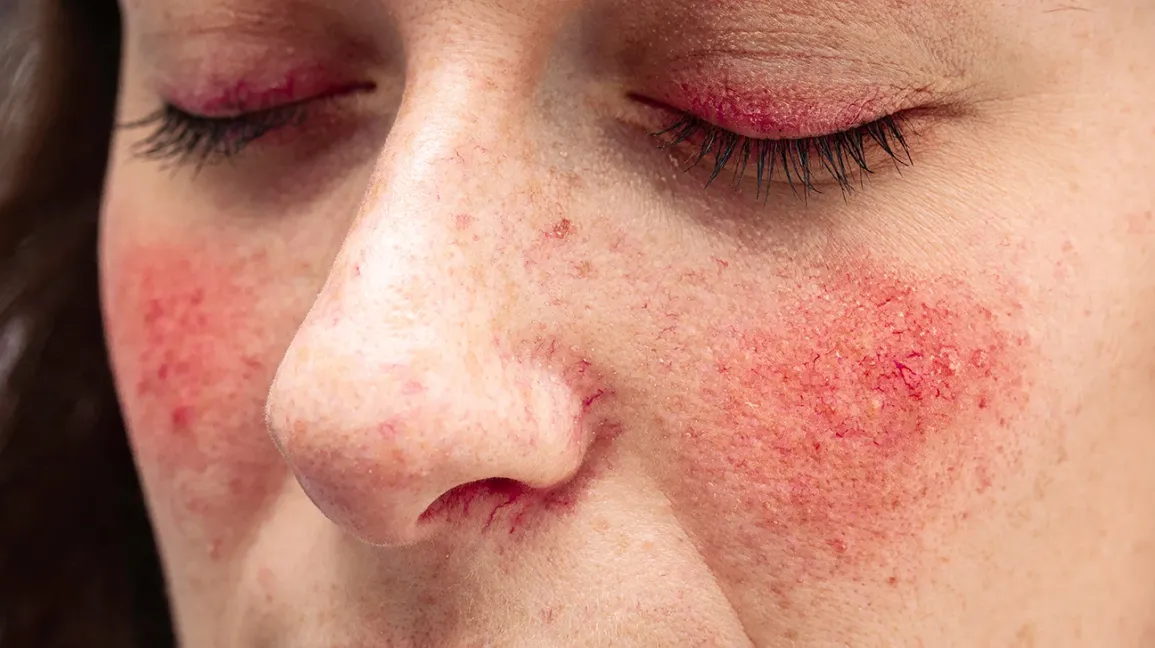
Tutorial case example

Clinical case example: 23-year-old with persistent centrofacial erythema and inflammatory papules on bilateral cheeks and nasal bridge, worsened by heat and exercise.

Primary: Patch Color: Erythema Location: Face - Malar Location: Face - General

Example only (not a graded answer key for your live cases).

Exam Steps

Step 1 - Choose Diagnosis
Rosacea ▼
Pick one diagnosis from the dropdown to unlock morphology and pinning.
Step 2 - Select Morphology Tags
1. Primary Morphology
Patch Papule
2. Secondary Morphology
Scale Crust
3. Color
Erythema Violaceous
4. Location / Distribution
Face - Malar Trunk
Choose all tags that apply from categories 1-4.
Pin + Edit Workflow
Place up to 3 pins. Drag pins to move. Use Edit to update selected tags on an existing pin.
Submit + Finish
Submit records the current case. On the final case, you may submit or go directly to results.
DermAcuity
1 / 5
Case 1 of 5
Clinical Presentation
Clinical History: Loading...
Step 1: Choose the most likely diagnosis
Begin typing to search or pick from the list.
Step 2: Describe the morphology
Select all terms that apply to the lesion you are about to pin. You can choose multiple.
1. Primary Morphology
Macule
Patch
Papule
Plaque
Nodule
Pustule
Vesicle
Bulla
Comedone
Wheal
Cyst
2. Secondary Morphology
Scale
Crust
Lichenification
Excoriation
Erosion
Ulcer
Fissure
Atrophy
Scar
Keloid
3. Color
Erythema
Violaceous
Hyperpigmented
Hypopigmented
Depigmented
Pink
Silver
Black/Blue
Yellow
White/Pearly
4. Location / Distribution
Scalp
Face - Malar
Face - General
Trunk
Flexural
Extensor
Acral
Diffuse
Nail Unit
Intertriginous
Pinned findings (optional)
Use pins to highlight up to 3 key lesions. Each pin captures the morphology you selected for that area. Drag pins to reposition and use Edit on a pinned finding to update selections.
No pinned findings yet.
Select morphology above, then pin key lesions on the image.
Step 3: Confidence & Submit
How confident are you in this diagnosis?
On the final case, click Submit Case first. Then End Exam / See Results becomes available.
Pinned finding draft
Select morphology above...
DermAcuity
| Session Results ()

Results Dashboard

Session ID:
Overall Accuracy
--%
Average AI Score
--
Bias (FST I–III vs IV–VI)
--
--
Cases Completed
--
Performance by Skin Type
Visualizing points earned out of total possible points across Fitzpatrick skin types (FST I–VI).
Target: 70%
Detailed Pathology Analysis
Average case score by pathology and Fitzpatrick group (I–III vs IV–VI). Bias exists when score gap > 15.
PATHOLOGY CASES SEEN AVG SCORE (FST I–III) AVG SCORE (FST IV–VI) BIAS RISK PROFILE
Case-by-Case Review
Review correct answers and your responses. Click View to see feedback and expert annotations.
STATUS CASE CATEGORY TOPIC YOUR ANSWER ACCURACY
DermAcuity
Results: Case 1